3DFastCraft Download

Tool · Tools tab

Corners that
stay down

Corner tabs hold down the corners of a part that lift off the plate. Its sharp corners get tabs as tall as a few layers, each held to the part by a thin gate low at its foot, run out to a frame round the part or ended in a pad of their own. After printing, snip the tabs off at their gates.

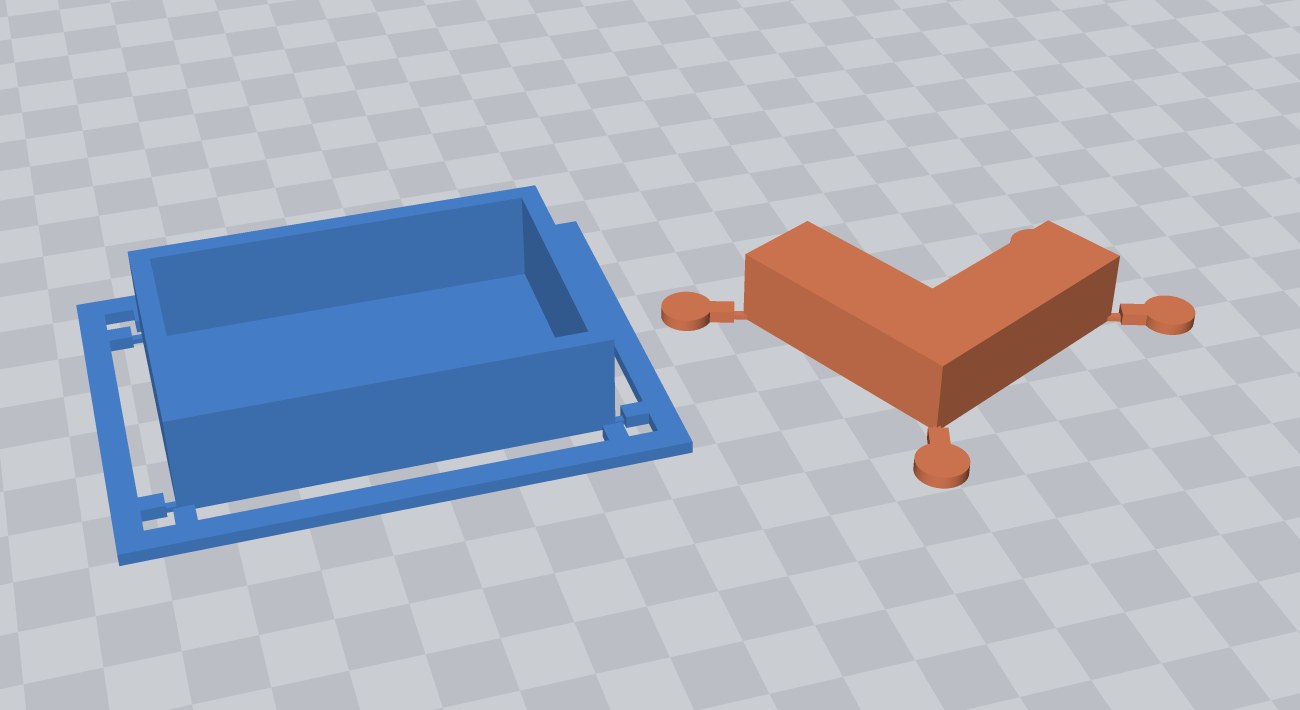
An open box with tabs at its corners run out to a frame, and an L turned on the plate with one tab out of each corner, ending in a pad
Left: an open box with the default settings — two tabs at every corner, run out to a frame. Right: an L turned on the plate, one tab out of each corner and a pad on each. The tabs take the part’s color and are an object of their own.

How to use it§ 01

  1. Select the part — or several, or nothing to take everything on the plate. It stays where it is.
  2. Click Corner tabs on the Tools tab. The sharp corners are found and the tabs shown on them.
  3. Click a corner in the view to take its tabs off, or to put tabs on a corner that was not found.
  4. Choose two tabs or one, a frame or pads, and set the sizes. The defaults are a good start.
  5. Click Add tabs, print the part as it stands, then snip the tabs off at their gates.

Every setting§ 02

Corners

The sharp corners, found: every corner of the part’s first layer that turns 45° or more, at any angle — a box turned on the plate, an L, a corner rounded off a little. A gentle curve is not a corner. Picked by hand starts from them; a click on a corner in the view puts its tabs on or takes them off.

Tabs at each corner

Two, one off each side just short of the corner: it is held both ways, and the cut is on a flat side. One, straight out of the point: half as many to cut, with the scar on the corner itself.

Frame round the part

Every tab runs out to a stiff frame that holds them all flat on the plate. Without it, each tab ends in a pad of its own.

Reach

How far the tabs stand out from the part: to the frame, or to the pad.

Frame

Width of the frame. Wider than a tab, it keeps the whole thing flat.

Pad

Width of the round pad at the end of each tab, without a frame. Nought for none.

Tab width and Height

How wide a tab is, and how tall the tabs, pads and frame stand: several layers, so a tab does not curl up with the corner as a one-layer mouse ear does.

Gate width and height

The thin end of a tab, where it meets the part — what is cut. Low, so its scar is at the foot; a few nozzle widths wide, so it holds and still snips cleanly.

Good to know§ 03

More tool guides: Cladding  ·  3D textures  ·  Windows  ·  Doors  ·  Mold  ·  Voronoi  ·  Kit sprue  ·  Connectors  ·  Align to face  ·  Fill up  ·  Pivot  ·  Repair and Rebuild  ·  Emboss  ·  History and versions  ·  Printer profile  ·  Download 3DFastCraft, free