Keep the shape
Only the corners stay: points in the middle of flat faces and along straight edges go, and every flat face is filled again from its outline. The web of slivers a boolean leaves is gone, and nothing moves.
Tools · Tools tab
Repair mends what would not print: it fills holes, drops slivers and turns faces the right way round. Rebuild goes further and makes the surface again — keeping the shape, or starting from scratch to mend anything.
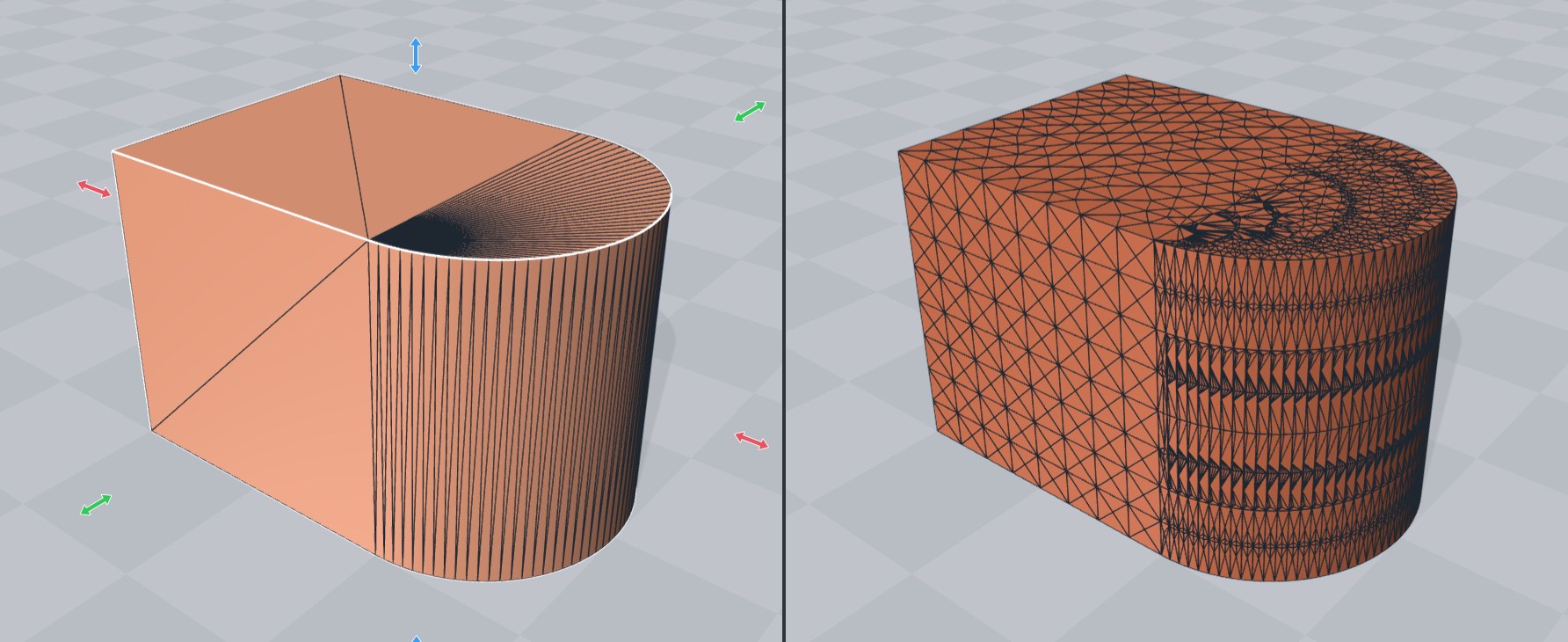
Only the corners stay: points in the middle of flat faces and along straight edges go, and every flat face is filled again from its outline. The web of slivers a boolean leaves is gone, and nothing moves.
Takes faces that are flat to within 0.01 mm as one — walls joined from separate parts become one wall.
Cuts the result into triangles of about one size, for Smooth, a deform or a texture.
Remakes the surface on a voxel grid and mends anything, even a model that passes through itself. Detail is the number of voxels across the model; the smallest feature that survives is one voxel.
More tool guides: Cladding · 3D textures · Windows · Doors · Mold · Voronoi · Connectors · Align to face · Fill up · Pivot · Kit sprue · Emboss · History and versions · Printer profile · Download 3DFastCraft, free