A cup, a box, a recess
Anything that is open at the top and holds liquid: it fills from the bottom up to the level.
Tool · Edit tab
Fill up fills what a part would hold if liquid were poured in from above, to a level you choose: the inside of a cup or a box, a recess, a sealed hollow. Keep the fill as a solid part of the model, or as a part of its own that fits the inside exactly.
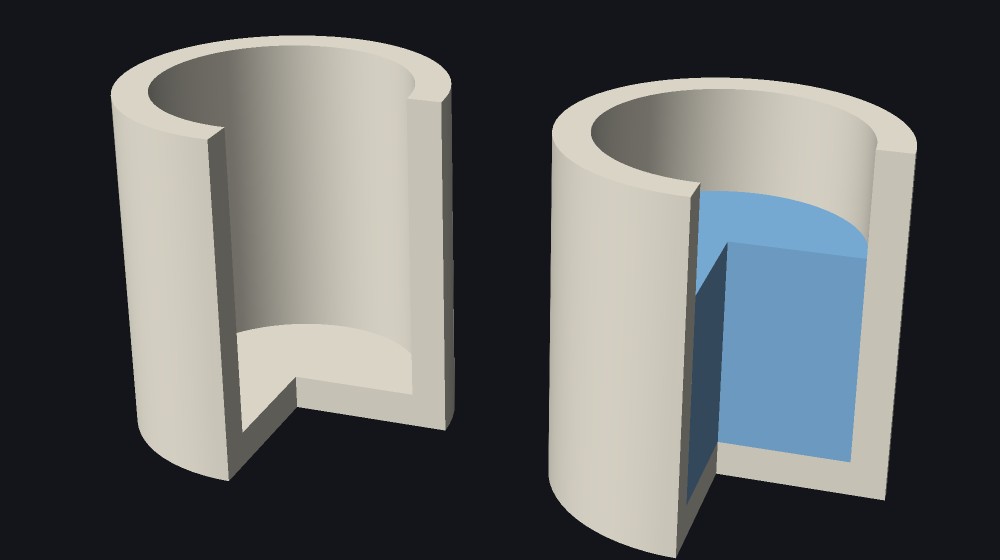
Anything that is open at the top and holds liquid: it fills from the bottom up to the level.
It fills only up to its opening, as liquid would. Above that it would run out.
A closed space inside a part fills whole.
Tick The plate is a floor, and a tube, a ring or walls standing on the plate fill as a cup does. The fill stands flat on the plate.
The inside becomes solid, up to the level. The part is one object again, and its volume goes up.
The fill is a separate object that fits the inside exactly. Print it in a second filament, or use it to see how much a cavity holds: the status bar gives its volume.
How high it is filled. At the top it is filled to the brim. Lower, it stops at that height, as liquid poured to a line would.
Nothing drains down through the plate, so a tube, a ring or walls standing on it fill like a cup.
The fill as a separate object. Off, the part is filled solid.
How many voxels run along the part’s longest side. The part keeps its own surface; this is how finely the fill finds its way into corners.
More tool guides: Cladding · 3D textures · Windows · Doors · Mold · Voronoi · Connectors · Align to face · Pivot · Download 3DFastCraft, free